Audit Events
The Audit Events page provides administrators with comprehensive visibility into all security-relevant actions and system events across GrantFlow. This immutable audit trail supports compliance requirements, security monitoring, and operational troubleshooting.
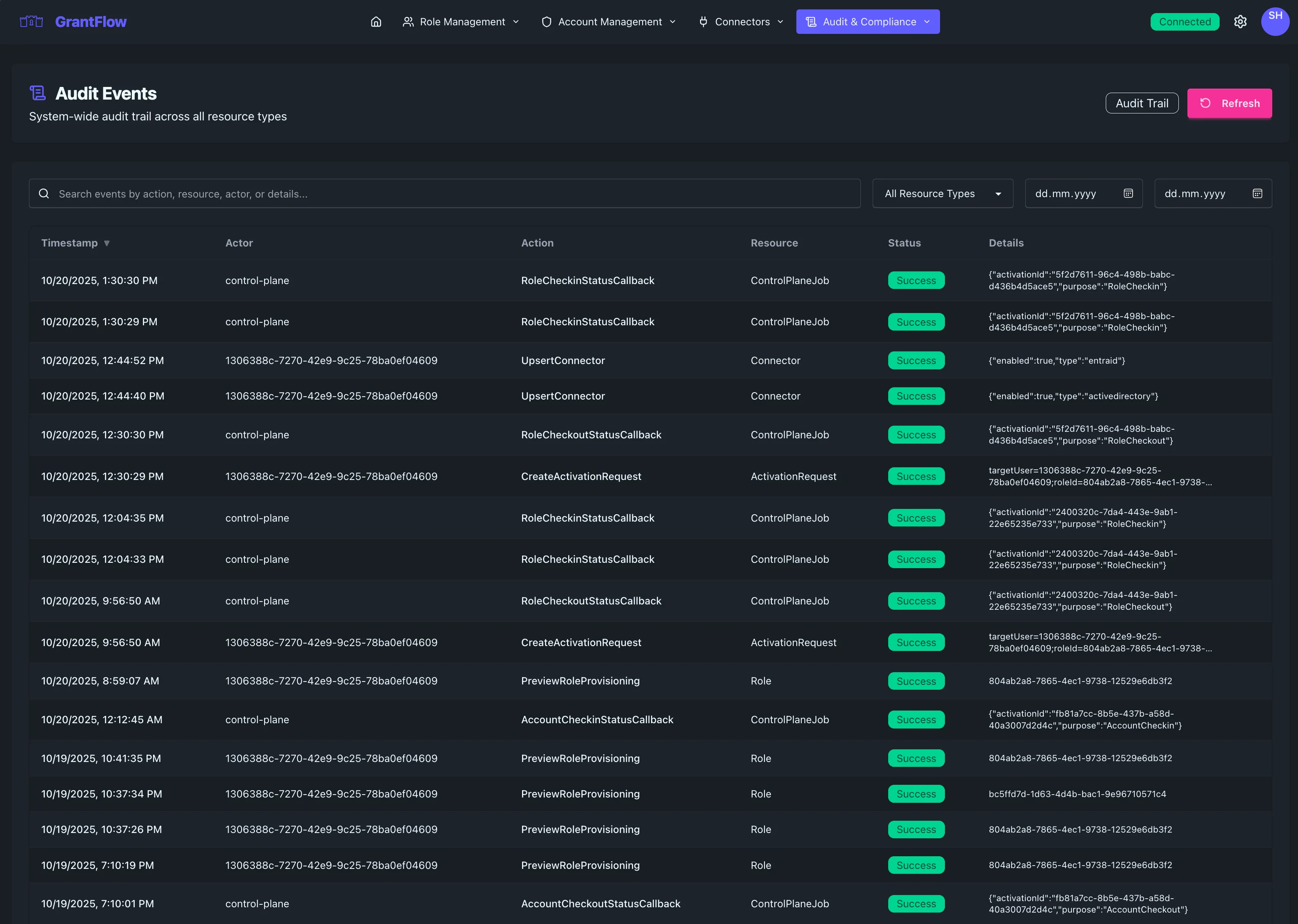
Overview
The Audit Events interface captures every significant action within GrantFlow, creating a tamper-proof record of who did what, when, and from where. This comprehensive logging helps you maintain compliance, investigate incidents, support access reviews, and demonstrate due diligence to auditors and stakeholders.
The Audit Events page is accessible only to users with administrative privileges. All audit queries are processed server-side with mandatory tenant filtering to ensure data isolation in multi-tenant deployments.
Audit Table
The main table presents a chronological view of all recorded events with the context needed to understand each action and its impact.
Event Information
Each row displays the event timestamp with date and time precision, the actor (user or system process) who initiated the action, the specific action performed (such as "Role Activated," "User Created," or "Approval Granted"), and the target resource affected by the action. Event severity is indicated by color-coded badges: neutral for routine operations, blue for informational events, amber for warnings, and red for critical security events.
Context Details
Additional context helps you understand the full picture. The source IP address shows where the action originated, useful for detecting anomalous access patterns or investigating potential security incidents. The user agent string reveals which client application or browser was used. A unique correlation ID ties related events together, allowing you to trace complex workflows like a role activation that triggered provisioning steps across multiple systems.
Event Outcome
Events clearly indicate whether the action succeeded or failed. Failed events include error messages or reasons, helping you identify configuration issues, permission problems, or potential security concerns quickly.
Search and Filtering
All filtering in the Audit Events page is performed server-side for security and performance. This ensures that large audit datasets are efficiently queried without loading excessive data to the browser, and that all filters respect tenant boundaries.
Search Bar
Use the search bar to find events by actor name, action type, resource, IP address, or any other field in the audit record. Results update dynamically to help you locate relevant events immediately.
Date Range Filtering
Focus on specific time windows using the date range picker. You can select preset ranges like "Last 24 Hours," "Last 7 Days," or "Last 30 Days," or define custom start and end dates for precise investigations. This is particularly useful for compliance reports, incident response, and scheduled access reviews.
Event Type Filter
Filter by event category to narrow the view to specific kinds of activity. See the Event Types Reference section below for a complete list of all auditable actions.
Actor Filter
Show events from a specific user, service account, or system process. This is particularly valuable during user access reviews or when investigating suspicious behavior attributed to a particular identity.
API Query Parameters
For programmatic access and advanced filtering, the audit events API supports these query parameters:
| Parameter | Type | Description |
|---|---|---|
startDate | ISO 8601 | Filter events after this timestamp |
endDate | ISO 8601 | Filter events before this timestamp |
actor | String | Filter by actor user ID or name |
action | String | Filter by action type (e.g., account.checkout) |
resourceType | String | Filter by resource type (e.g., Account, Role) |
status | String | Filter by outcome (Success, Failed, Denied) |
limit | Number | Maximum results per page (default 50, max 1000) |
offset | Number | Pagination offset |
Event Details
Click any event row to open the detailed view with complete information.
Full Event Record
The detail panel shows every captured field including the complete request payload, response data, before and after states for changes, full stack traces for errors, and all metadata associated with the event.
Related Events
The correlation ID links to other events in the same logical transaction. For example, a single role activation might generate events for the request submission, approval decision, provisioning steps in Entra ID, group membership changes in Active Directory, and the final activation confirmation. Related events appear as a timeline so you can understand the full sequence.
Event Context
Contextual information includes the tenant scope, the session ID, authentication method used, and whether the action was performed interactively by a user or automatically by the system.
Export and Reporting
Export Options
Audit data can be exported to CSV or JSON format for analysis in external tools, compliance reporting, or long-term archival. Exports respect the current search and filter settings, allowing you to extract precisely the data you need.
Compliance Reports
GrantFlow supports automated compliance reporting for common frameworks. You can generate reports showing all privileged access within a time period, all changes to critical roles, all approval decisions, or all failed authentication attempts. Reports are formatted for submission to auditors and include all required fields.
Retention and Archival
Retention Policy
Audit events are retained according to your organization's compliance requirements. Most deployments retain detailed logs for 90 days online with immediate access, with older events archived for long-term storage. Your retention settings can be customized based on regulatory needs.
Data Integrity
The audit trail uses cryptographic techniques to ensure records cannot be modified or deleted after creation. Each event is digitally signed, and any attempt to tamper with historical logs is detectable. This immutability is critical for forensic investigations and regulatory compliance.
Common Use Cases
Security Monitoring
Monitor for suspicious patterns such as repeated failed login attempts from unusual locations, privilege escalations outside business hours, or access to sensitive roles by unexpected users. The audit trail provides the evidence needed to detect and respond to security incidents.
Compliance Audits
Demonstrate to auditors that privileged access is properly controlled and monitored. Show who accessed what, when approvals were required and granted, and that the principle of least privilege is enforced through time-limited activations.
Access Reviews
Support periodic access reviews by showing which roles each user activated, how frequently activations occurred, and whether the access pattern aligns with job responsibilities. Export reports for review committees and document review decisions.
Troubleshooting
When users report access problems or provisioning issues, the audit trail provides step-by-step visibility into what happened. Trace failed activations, identify where provisioning steps failed, and determine whether the issue was a configuration problem, a transient network error, or a permission issue in the target system.
Change Management
Track all configuration changes made by administrators, including who created new roles, modified approval policies, added or removed user assignments, or changed connector settings. This audit trail supports change management processes and helps maintain configuration integrity.
Pagination
For large audit datasets, pagination controls help you navigate efficiently. The page shows the current range of events displayed and the total count, with previous and next buttons to move through results. By default, 50 events are shown per page, but you can adjust this to view more or fewer records at once.
Real-Time Updates
The Audit Events view updates in near real-time as new events are captured.
Event Latency
Most events appear within seconds of the action occurring. High-frequency events may be batched for performance, but critical security events are always logged immediately.
Refresh
The page automatically refreshes periodically, or you can manually refresh to see the latest events instantly.
Event Types Reference
GrantFlow captures a comprehensive set of audit events across all system operations. Each event includes the action performed, the resource affected, the actor who initiated the action, and the outcome.
Account Events
| Action | Description |
|---|---|
account.create | New privileged account created |
account.update | Account details modified |
account.delete | Account removed from GrantFlow |
account.checkout | User checked out an account |
account.checkin | User checked in an account |
account.enable | Account enabled for use |
account.disable | Account disabled |
account.admin_end_checkout | Administrator forcibly ended a checkout |
account.preview_provisioning | Provisioning preview generated |
Account Link Events
| Action | Description |
|---|---|
account_link.create | Account assigned to a user |
account_link.delete | Account assignment removed |
Role Events
| Action | Description |
|---|---|
role.create | New role created |
role.update | Role configuration modified |
role.delete | Role removed |
role.assign | Role assigned to user |
role.unassign | Role assignment removed |
Role Assignment Events
| Action | Description |
|---|---|
role_assignment.create | Role assignment created |
role_assignment.delete | Role assignment deleted |
Activation Events
| Action | Description |
|---|---|
activation.request | User requested role activation |
activation.approve | Activation request approved |
activation.deny | Activation request denied |
activation.activate | Role activated for user |
activation.expire | Activation expired automatically |
activation.cancel | Activation cancelled |
activation.extend | Activation duration extended |
Activation Request Events
| Action | Description |
|---|---|
activation_request.create | New activation request submitted |
activation_request.cancel | Activation request cancelled by user |
activation_request.expire | Activation request expired without approval |
Eligibility Events
| Action | Description |
|---|---|
eligibility.create | User eligibility for role created |
eligibility.update | Eligibility settings modified |
eligibility.delete | Eligibility removed |
Approver Policy Events
| Action | Description |
|---|---|
approver_policy.create | New approval policy created |
approver_policy.update | Approval policy modified |
approver_policy.delete | Approval policy removed |
approver_policy.assign | Policy assigned to role |
approver_policy.validate | Policy validation performed |
Account Policy Events
| Action | Description |
|---|---|
account_policy.create | New account policy created |
account_policy.update | Account policy modified |
account_policy.delete | Account policy removed |
account_policy.assign | Policy assigned to account |
Password Events
| Action | Description |
|---|---|
password.reveal | User revealed account password |
password.rotate | Password rotated |
password.rotation | Password rotation completed |
password_rotation.trigger | Manual password rotation triggered |
password_rotation.scheduled | Scheduled rotation executed |
password_rotation.cancel | Password rotation cancelled |
Connector Events
| Action | Description |
|---|---|
connector.create | New connector created |
connector.update | Connector configuration modified |
connector.delete | Connector removed |
connector.validate | Connector validation performed |
connector.sync | Directory sync initiated |
connector.upsert | Connector created or updated |
connector.test | Connector test executed |
Role Provisioning Events
| Action | Description |
|---|---|
role_provisioning.create | Provisioning rule created |
role_provisioning.update | Provisioning rule modified |
role_provisioning.delete | Provisioning rule removed |
role_provisioning.preview | Provisioning preview generated |
provisioning.create | Provisioning action executed |
provisioning.delete | Provisioning removed |
provisioning.preview | Provisioning preview |
Agent Events
| Action | Description |
|---|---|
agent.create | New agent registered |
agent.update | Agent configuration modified |
agent.delete | Agent removed |
agent.revoke | Agent certificate revoked |
agent.update_connector | Agent connector assignment changed |
agent.update_capabilities | Agent capabilities modified |
agent.regenerate_enrollment_code | New enrollment token generated |
Job Events
| Action | Description |
|---|---|
job.create | Background job created |
job.complete | Job completed successfully |
job.fail | Job failed |
job.cancel | Job cancelled |
job.callback | Job callback received |
job.submit_ad_sync | AD sync job submitted |
job.submit_ad_test | AD connection test submitted |
job.submit_entra_sync | Entra ID sync job submitted |
job.submit_entra_test | Entra ID connection test submitted |
Callback Events
| Action | Description |
|---|---|
callback.account_checkout | Checkout callback processed |
callback.sync_result | Sync result callback received |
callback.password_rotation | Password rotation callback processed |
Authentication Events
| Action | Description |
|---|---|
auth.login | User logged in |
auth.logout | User logged out |
auth.mfa | MFA challenge completed |
User Events
| Action | Description |
|---|---|
user.create | New user created |
user.update | User profile modified |
user.delete | User removed |
Rate Limiting Events
| Action | Description |
|---|---|
rate_limit.exceeded | Rate limit exceeded for user |
rate_limit.ip_exceeded | IP-based rate limit exceeded |
Administrative Events
| Action | Description |
|---|---|
admin.access_denied | Administrative access denied |
audit_log.list | Audit log listing accessed |
audit_log.view | Audit log entry viewed |
Resource Types
Each event is associated with a resource type for easier filtering:
| Resource Type | Description |
|---|---|
Account | Privileged account |
AccountLink | Account-to-user assignment |
AccountCheckout | Active checkout session |
Role | GrantFlow role |
RoleAssignment | Role-to-user assignment |
Activation | Active role activation |
ActivationRequest | Pending activation request |
Eligibility | User eligibility for role |
ApproverPolicy | Approval workflow policy |
AccountPolicy | Account checkout policy |
Connector | Identity connector |
User | GrantFlow user |
Session | User session |
Password | Account password |
PasswordRotation | Password rotation job |
RoleProvisioning | Provisioning configuration |
Job | Background job |
Agent | On-premises agent |
ControlPlaneJob | Control plane job |
API | API operation |
AuditLog | Audit log access |
Event Status
Every audit event includes an outcome status:
| Status | Description |
|---|---|
Success | Operation completed successfully |
Failed | Operation failed (check details for reason) |
Denied | Operation denied due to authorization |
Pending | Operation is pending completion |
Throttled | Operation rejected due to rate limiting |
Best Practices
Regular Monitoring
Establish a routine for reviewing audit events, particularly focusing on critical security actions, failed operations, and out-of-hours activity. Proactive monitoring helps detect issues before they escalate.
Alert Configuration
Consider configuring alerts for high-severity events or unusual patterns. While alert configuration happens outside the Audit Events page, the events captured here form the foundation for automated security monitoring.
Documentation
When investigating incidents or conducting access reviews, document your findings by exporting relevant audit records and including them in your reports. The correlation IDs and detailed context make it easy to reconstruct exactly what happened.
Training
Ensure your security and compliance teams understand how to read and interpret audit events. Regular training on common event types, severity levels, and investigation techniques ensures your team can respond effectively to security concerns.