Audit Events
The Audit Events page provides administrators with comprehensive visibility into all security-relevant actions and system events across GrantFlow. This immutable audit trail supports compliance requirements, security monitoring, and operational troubleshooting.
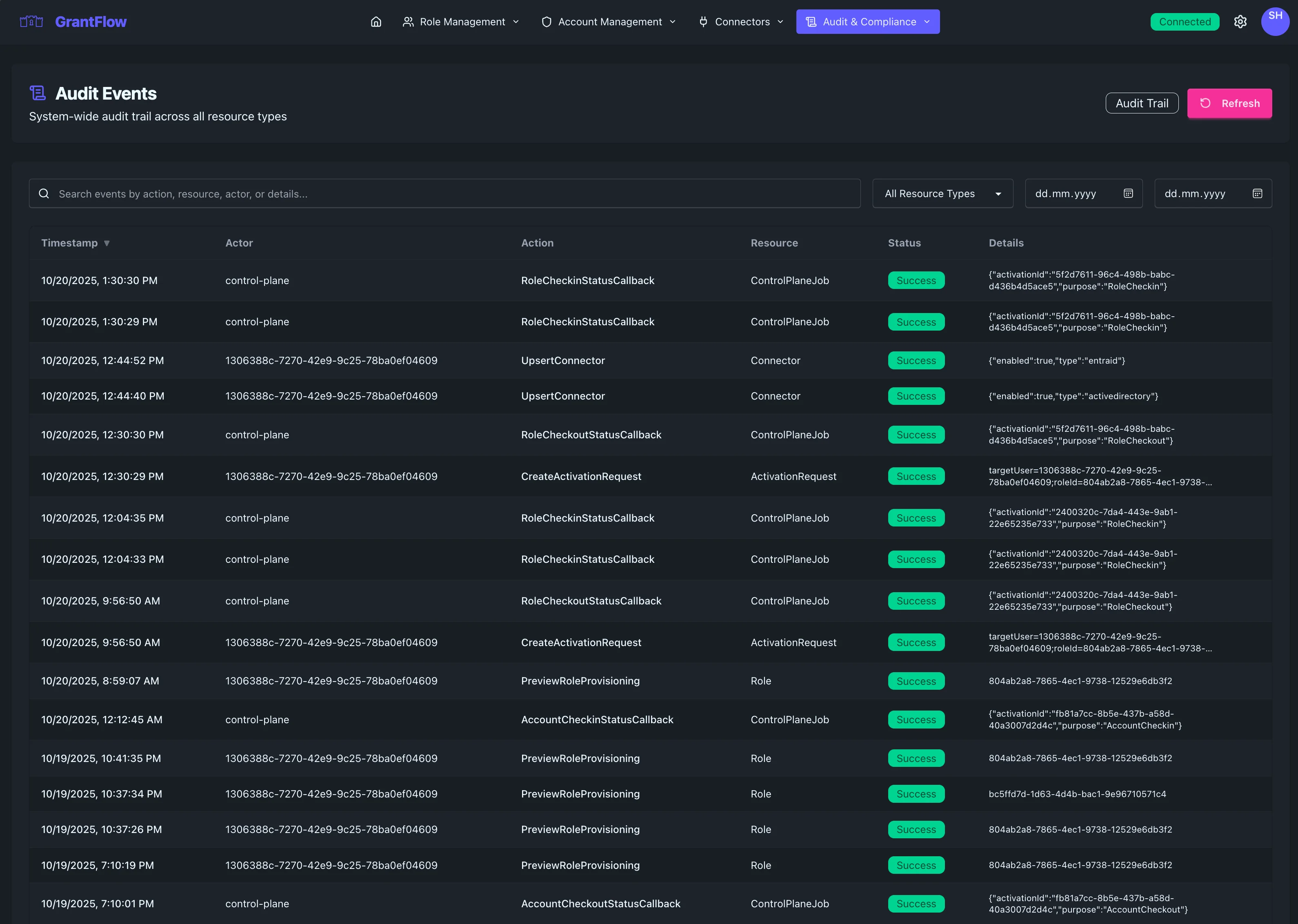
Overview
The Audit Events interface captures every significant action within GrantFlow, creating a tamper-proof record of who did what, when, and from where. This comprehensive logging helps you maintain compliance, investigate incidents, support access reviews, and demonstrate due diligence to auditors and stakeholders.
Admin Access Required
The Audit Events page is accessible only to users with administrative privileges. All audit queries are processed server-side with mandatory tenant filtering to ensure data isolation in multi-tenant deployments.
Audit Table
The main table presents a chronological view of all recorded events with the context needed to understand each action and its impact.
Event Information
Each row displays the event timestamp with date and time precision, the actor (user or system process) who initiated the action, the specific action performed (such as "Role Activated," "User Created," or "Approval Granted"), and the target resource affected by the action. Event severity is indicated by color-coded badges: neutral for routine operations, blue for informational events, amber for warnings, and red for critical security events.
Context Details
Additional context helps you understand the full picture. The source IP address shows where the action originated, useful for detecting anomalous access patterns or investigating potential security incidents. The user agent string reveals which client application or browser was used. A unique correlation ID ties related events together, allowing you to trace complex workflows like a role activation that triggered provisioning steps across multiple systems.
Event Outcome
Events clearly indicate whether the action succeeded or failed. Failed events include error messages or reasons, helping you identify configuration issues, permission problems, or potential security concerns quickly.
Search and Filtering
All filtering in the Audit Events page is performed server-side for security and performance. This ensures that large audit datasets are efficiently queried without loading excessive data to the browser, and that all filters respect tenant boundaries.
Search Bar
Use the search bar to find events by actor name, action type, resource, IP address, or any other field in the audit record. Results update dynamically to help you locate relevant events immediately.
Date Range Filtering
Focus on specific time windows using the date range picker. You can select preset ranges like "Last 24 Hours," "Last 7 Days," or "Last 30 Days," or define custom start and end dates for precise investigations. This is particularly useful for compliance reports, incident response, and scheduled access reviews.
Event Type Filter
Filter by event category to narrow the view to specific kinds of activity. See the Event Types Reference section below for a complete list of all auditable actions.
Actor Filter
Show events from a specific user, service account, or system process. This is particularly valuable during user access reviews or when investigating suspicious behavior attributed to a particular identity.
API Query Parameters
For programmatic access and advanced filtering, the audit events API supports these query parameters:
| Parameter | Type | Description |
|---|---|---|
startDate | ISO 8601 | Filter events after this timestamp |
endDate | ISO 8601 | Filter events before this timestamp |
actor | String | Filter by actor user ID or name |
action | String | Filter by action type (e.g., account.checkout) |
resourceType | String | Filter by resource type (e.g., Account, Role) |
status | String | Filter by outcome (Success, Failed, Denied) |
limit | Number | Maximum results per page (default 50, max 1000) |
offset | Number | Pagination offset |
Event Details
Click any event row to open the detailed view with complete information.
Full Event Record
The detail panel shows every captured field including the complete request payload, response data, before and after states for changes, full stack traces for errors, and all metadata associated with the event.
Related Events
The correlation ID links to other events in the same logical transaction. For example, a single role activation might generate events for the request submission, approval decision, provisioning steps in Entra ID, group membership changes in Active Directory, and the final activation confirmation. Related events appear as a timeline so you can understand the full sequence.
Event Context
Contextual information includes the tenant scope, the session ID, authentication method used, and whether the action was performed interactively by a user or automatically by the system.
Export and Reporting
Export Options
Audit data can be exported to CSV or JSON format for analysis in external tools, compliance reporting, or long-term archival. Exports respect the current search and filter settings, allowing you to extract precisely the data you need.
Compliance Reports
GrantFlow supports automated compliance reporting for common frameworks. You can generate reports showing all privileged access within a time period, all changes to critical roles, all approval decisions, or all failed authentication attempts. Reports are formatted for submission to auditors and include all required fields.
Retention and Archival
Retention Policy
Audit events are retained according to your organization's compliance requirements. Most deployments retain detailed logs for 90 days online with immediate access, with older events archived for long-term storage. Your retention settings can be customized based on regulatory needs.
Data Integrity
The audit trail uses cryptographic techniques to ensure records cannot be modified or deleted after creation. Each event is digitally signed, and any attempt to tamper with historical logs is detectable. This immutability is critical for forensic investigations and regulatory compliance.
Common Use Cases
Security Monitoring
Monitor for suspicious patterns such as repeated failed login attempts from unusual locations, privilege escalations outside business hours, or access to sensitive roles by unexpected users. The audit trail provides the evidence needed to detect and respond to security incidents.
Compliance Audits
Demonstrate to auditors that privileged access is properly controlled and monitored. Show who accessed what, when approvals were required and granted, and that the principle of least privilege is enforced through time-limited activations.
Access Reviews
Support periodic access reviews by showing which roles each user activated, how frequently activations occurred, and whether the access pattern aligns with job responsibilities. Export reports for review committees and document review decisions.
Troubleshooting
When users report access problems or provisioning issues, the audit trail provides step-by-step visibility into what happened. Trace failed activations, identify where provisioning steps failed, and determine whether the issue was a configuration problem, a transient network error, or a permission issue in the target system.
Change Management
Track all configuration changes made by administrators, including who created new roles, modified approval policies, added or removed user assignments, or changed connector settings. This audit trail supports change management processes and helps maintain configuration integrity.
Pagination
For large audit datasets, pagination controls help you navigate efficiently. The page shows the current range of events displayed and the total count, with previous and next buttons to move through results. By default, 50 events are shown per page, but you can adjust this to view more or fewer records at once.
Real-Time Updates
The Audit Events view updates in near real-time as new events are captured.
Event Latency
Most events appear within seconds of the action occurring. High-frequency events may be batched for performance, but critical security events are always logged immediately.
Refresh
The page automatically refreshes periodically, or you can manually refresh to see the latest events instantly.
Event Types Reference
GrantFlow captures a comprehensive set of audit events across all system operations. Each event includes the action performed, the resource affected, the actor who initiated the action, and the outcome.
Account Events
| Action | Description |
|---|---|
account.create | New privileged account created |
account.update | Account details modified |
account.delete | Account removed from GrantFlow |
account.checkout | User checked out an account |
account.checkin | User checked in an account |
account.checkin_retry | A check-in whose account disable failed was tried again |
account.checkin_resolve | An administrator closed a failed check-in on their own word (shown as Check-in Resolved by Admin) |
account.checkout_dismiss | A requester cleared a failed checkout from their own cards. The checkout record is unchanged |
account.enable | Account enabled for use |
account.disable | Account disabled |
account.admin_end_checkout | Administrator forcibly ended a checkout |
account.preview_provisioning | Provisioning preview generated |
Resolved check-ins
GrantFlow never observed the account being disabled when an administrator resolves a failed check-in, so account.checkin_resolve is the only record of why the checkout stopped representing live access. Its details carry the resolution (disabled_in_directory or directory_object_deleted), the administrator's note, and the failureCode of the failure it closed. On disabled_in_directory, GrantFlow also tries to rotate the account's password with the rotation reason checkin_resolve. The details then record rotationRequested, plus rotationSkipped with the reason when no rotation was started. These fields describe whether a rotation was requested, not whether it finished: a requested rotation runs as a password job that can stay pending or fail, so check that job in Connector Jobs before you treat the old password as replaced.
Expired passwords at checkout
When a checkout finds the account's password expired, GrantFlow rotates it before the checkout continues. That rotation is recorded as password_rotation.trigger, attributed to the requester, with trigger: expired_at_checkout and joined: true when the checkout waited for a rotation that was already running. A rotation that could not start is recorded as Failed, with rotationRequested: false and rotationSkipped. If the checkout is still refused, account.checkout is recorded as Denied with the reason password_rotating (the rotation is still running, so the requester can retry) or password_expired.
Account Link Events
| Action | Description |
|---|---|
account_link.create | Account assigned to a user |
account_link.delete | Account assignment removed |
Role Events
| Action | Description |
|---|---|
role.create | New role created |
role.update | Role configuration modified |
role.delete | Role removed |
role.assign | Role assigned to user |
role.unassign | Role assignment removed |
role.assignment_update | An existing role assignment was re-timed, for example extended (shown as Role Assignment Extended) |
Role Assignment Events
| Action | Description |
|---|---|
role_assignment.create | Role assignment created |
role_assignment.delete | Role assignment deleted |
Activation Events
| Action | Description |
|---|---|
activation.request | User requested role activation |
activation.approve | Activation request approved |
activation.deny | Activation request denied |
activation.activate | Role activated for user |
activation.expire | Activation expired automatically |
activation.cancel | Activation cancelled |
activation.extend | Activation duration extended |
activation.revoke_retry | The removal of an activation whose deprovisioning failed was tried again |
activation.drift_detected | The directory disagreed with GrantFlow's record when access was granted or removed, for example the user was already a member or was no longer one |
activation.converge_hint | Provisioning resolved the session target sent with the request, for confirming the AD change on the domain controllers that serve that target |
Session target hints
When a user starts a session from a target, the portal sends that target along with the activation request or account checkout. GrantFlow keeps the target only if one of the user's roles grants access to it. Otherwise it drops the target without telling the requester, and the request goes ahead unchanged. The target only decides which domain controllers GrantFlow checks for the AD change. It never grants access.
The outcome is recorded in these details keys:
| Key | Values | Present |
|---|---|---|
convergeHint | applied or dropped | Whenever a target was sent |
convergeTargetId | The tunnel target ID | When the hint was dropped, and on activation.converge_hint when it was applied |
convergeHintReason | not_granted, not_found, check_failed, connector_ambiguous | When the hint was dropped |
convergeTargetConnectorId | The AD connector whose domain controllers are checked | activation.converge_hint only, when the hint was applied |
The keys appear on activation_request.create and account.checkout when the request is made. activation.converge_hint is recorded once, when an activation request that carries a target is provisioned and its role writes at least one AD group membership. At that point GrantFlow checks again that the role still grants the target and that the target still exists and is enabled. not_found covers a deleted or disabled target, and check_failed a lookup that failed. connector_ambiguous means GrantFlow could not tell which AD connector the target belongs to, for example because the target is an IP address and the role writes to several AD domains. The target's host name is never recorded.
Activation Request Events
| Action | Description |
|---|---|
activation_request.create | New activation request submitted |
activation_request.cancel | Activation request cancelled by user |
activation_request.expire | Activation request expired without approval |
activation_request.list | Activation requests were listed |
activation_request.dismiss | A requester cleared a failed activation from their own cards. The request keeps its failed provisioning status |
Approval decisions
activation.approve and activation.deny record each decision on an activation request. Under a policy that needs two approvers, the first approval is recorded with outcome: awaiting further approval in its details. Each person's approval is recorded once: if the same person approves a request that is still pending again (a double click, a retry or a second device), no second activation.approve event is recorded.
activation.deny carries reason and reasonCode in its details. Both are stored after GrantFlow removes control, direction-override and invisible characters, so the audit trail shows the text the requester and the notification email see. See Denial reasons.
A decision made on a Microsoft Teams approval card is recorded with the channel teams. Such events have no source IP address, user agent or IP location, because the request reaches GrantFlow through the Microsoft Bot Framework and not from the approver's device.
Eligibility Events
| Action | Description |
|---|---|
eligibility.create | User eligibility for role created |
eligibility.update | Eligibility settings modified |
eligibility.delete | Eligibility removed |
Approver Policy Events
| Action | Description |
|---|---|
approver_policy.create | New approval policy created |
approver_policy.update | Approval policy modified |
approver_policy.delete | Approval policy removed |
approver_policy.assign | Policy assigned to role |
approver_policy.validate | Policy validation performed |
Account Policy Events
| Action | Description |
|---|---|
account_policy.create | New account policy created |
account_policy.update | Account policy modified |
account_policy.delete | Account policy removed |
account_policy.assign | Policy assigned to account |
Password Events
| Action | Description |
|---|---|
password.reveal | User revealed account password |
password.rotate | Password rotated |
password.rotation | Password rotation completed |
password_rotation.trigger | Off-schedule rotation started: manual or API, after session use, after a rejected credential, or at checkout of an expired password |
password_rotation.scheduled | Scheduled rotation executed |
password_rotation.cancel | Password rotation cancelled |
Connector Events
| Action | Description |
|---|---|
connector.create | New connector created |
connector.update | Connector configuration modified |
connector.delete | Connector removed |
connector.validate | Connector validation performed |
connector.sync | Directory sync initiated |
connector.upsert | Connector created or updated |
connector.test | Connector test executed |
connector.credential_migrate | A connector credential stored directly was moved into Azure Key Vault when it was used, or a superseded copy was removed |
Role Provisioning Events
| Action | Description |
|---|---|
role_provisioning.create | Provisioning rule created |
role_provisioning.update | Provisioning rule modified |
role_provisioning.delete | Provisioning rule removed |
role_provisioning.preview | Provisioning preview generated |
provisioning.create | Provisioning action executed |
provisioning.delete | Provisioning removed |
provisioning.preview | Provisioning preview |
Agent Events
| Action | Description |
|---|---|
agent.create | New agent registered |
agent.update | Agent configuration modified |
agent.delete | Agent removed |
agent.revoke | Agent certificate revoked |
agent.update_connector | Agent connector assignment changed |
agent.update_capabilities | Agent capabilities modified |
agent.regenerate_enrollment_code | New enrollment token generated |
agent.force_cert_renewal | An administrator forced the agent to renew its certificate |
agent.certificate_issued | The agent's certificate was issued at enrollment |
agent.certificate_renewed | The agent's certificate was renewed |
agent.certificate_refused | A certificate request from the agent was refused |
agent.self_update_requested | An administrator selected Update now for the agent |
agent.self_update_completed | The agent reported a successful self-update |
agent.self_update_failed | The agent reported a failed self-update |
agent.self_update_blocked | The agent was excluded from further automatic updates after repeated failures (shown as Agent Updates Blocked) |
agent_update_policy.set | The tenant-wide agent update policy was changed. It names no single agent |
Job Events
| Action | Description |
|---|---|
job.create | Background job created |
job.complete | Job completed successfully |
job.fail | Job failed |
job.cancel | Job cancelled |
job.callback | Job callback received |
job.submit_ad_sync | AD sync job submitted |
job.submit_ad_test | AD connection test submitted |
job.submit_entra_sync | Entra ID sync job submitted |
job.submit_entra_test | Entra ID connection test submitted |
Callback Events
| Action | Description |
|---|---|
callback.account_checkout | Checkout callback processed |
callback.sync_result | Sync result callback received |
callback.password_rotation | Password rotation callback processed |
Authentication Events
| Action | Description |
|---|---|
auth.login | User logged in |
auth.logout | User logged out |
auth.mfa | MFA challenge completed |
User Events
| Action | Description |
|---|---|
user.create | New user created |
user.update | User profile modified |
user.delete | User removed |
Rate Limiting Events
| Action | Description |
|---|---|
rate_limit.exceeded | Rate limit exceeded for user |
rate_limit.ip_exceeded | IP-based rate limit exceeded |
Administrative Events
| Action | Description |
|---|---|
admin.access_denied | Administrative access denied |
audit_log.list | Audit log listing accessed |
audit_log.view | Audit log entry viewed |
compliance_report.view | A compliance report was viewed |
access_paths.person_viewed | An administrator viewed one person's live access paths |
MCP Events
| Action | Description |
|---|---|
mcp.read | An AI assistant connected through the GrantFlow MCP server called a read tool |
mcp.write | An AI assistant called a write tool, including calls that only returned a preview |
Every MCP tool call writes one of these events, with the tool's name in details.tool. When a write tool changes something, the change itself is recorded again under its usual action, for example eligibility.create, with the channel mcp.
Resource Types
Each event is associated with a resource type for easier filtering:
| Resource Type | Description |
|---|---|
Account | Privileged account |
AccountLink | Account-to-user assignment |
AccountCheckout | Active checkout session |
Role | GrantFlow role |
RoleAssignment | Role-to-user assignment |
Activation | Active role activation |
ActivationRequest | Pending activation request |
Eligibility | User eligibility for role |
ApproverPolicy | Approval workflow policy |
AccountPolicy | Account checkout policy |
Connector | Identity connector |
User | GrantFlow user |
Session | User session |
Password | Account password |
PasswordRotation | Password rotation job |
RoleProvisioning | Provisioning configuration |
Job | Background job |
Agent | On-premises agent |
AgentUpdatePolicy | Tenant-wide agent update policy |
ControlPlaneJob | Control plane job |
API | API operation |
AuditLog | Audit log access |
NotificationTemplate | Notification template |
NotificationConfig | Notification channel configuration |
Report | Compliance report |
Group | Directory group, as the subject of an access read |
EntraRole | Entra ID role, as the subject of an access read |
TunnelZone | Remote session zone |
TunnelTarget | Remote session target |
TunnelFolder | Folder that organizes session targets |
TunnelSettings | Recording retention and playback settings |
TunnelSession | Remote session |
TeamsConversation | A user's 1:1 chat with the GrantFlow Teams app |
TeamsSettings | The tenant's Teams approval cards switch |
Event Status
Every audit event includes an outcome status:
| Status | Description |
|---|---|
Success | Operation completed successfully |
Failed | Operation failed (check details for reason) |
Denied | Operation denied due to authorization |
Pending | Operation is pending completion |
Throttled | Operation rejected due to rate limiting |
Notification Events
| Event Type | Shown As | Description |
|---|---|---|
notification_template.create | Notification Template Created | A notification template was created |
notification_template.update | Notification Template Updated | A notification template was replaced |
notification_template.patch | Notification Template Patched | Part of a notification template was changed |
notification_template.delete | Notification Template Deleted | A notification template was deleted |
notification_template.seed | Notification Templates Seeded | The default notification templates were created |
notification_template.send_test | Test Notification Sent | A test notification was sent from a template |
notification_config.update | Channel Config Updated | A notification channel's configuration was changed |
Individual notification deliveries are not audit events. See the Notification Delivery Log for them.
Session Events
| Event Type | Shown As | Description |
|---|---|---|
browser_session.history_list | Session History Listed | Browser session history was listed |
Audit entries are correlated via a session identifier, enabling end-to-end tracing of actions within a single login session. See Browser Sessions.
Remote Session Configuration Events
| Event Type | Shown As | Description |
|---|---|---|
tunnel.zone.created | Zone Created | A session zone was created |
tunnel.zone.updated | Zone Updated | A session zone was changed |
tunnel.zone.deleted | Zone Deleted | A session zone was deleted |
tunnel.zone.allowlist_pushed | Zone Allowlist Pushed | A zone's derived allowlist was pushed to its agents, with version, outcome and per-agent counts. The actor is the administrator whose change triggered it |
tunnel.zone.allowlist_migrated | Zone Allowlist Migrated | A zone's connection policy was moved, once, into its derived allowlist, with the rules dropped and the hosts that need review |
tunnel.target.created | Target Created | A session target was created |
tunnel.target.updated | Target Updated | A session target was changed |
tunnel.target.deleted | Target Deleted | A session target was deleted |
tunnel.target.imported | Target Imported | Session targets were imported |
tunnel.target.moved | Targets Moved to Folder | Targets were moved between folders in one step, with each target's previous folder |
tunnel.folder.created | Folder Created | A session target folder was created |
tunnel.folder.updated | Folder Updated | A session target folder was renamed or moved |
tunnel.folder.deleted | Folder Deleted | A session target folder was deleted |
tunnel.target.identity_pinned | Target Identity Pinned | A target's server identity was pinned |
tunnel.target.identity_cleared | Target Identity Cleared | A target's pinned server identity was cleared |
tunnel.target.identity_check_changed | Target Identity Check Changed | The server identity check of a target was turned on or off |
tunnel.target.identity_probed | Target Identity Probed | GrantFlow connected to a target to read its server identity |
tunnel.agent.limits_set | Tunnel Agent Limits Set | An administrator changed one tunnel agent's data limits |
tunnel.role.targets_set | Role Targets Set | The session targets a role grants access to were changed. Recorded against the role |
tunnel.settings.updated | Session Settings Updated | Recording retention, or who may play recordings back, was changed |
Folders only organize targets on the Sessions page and grant nothing. Marking a target as a favorite and the recently used list are personal views and write no audit events.
Remote Session Lifecycle Events
| Event Type | Shown As | Description |
|---|---|---|
tunnel.session.requested | Session Requested | A user asked to open a remote session |
tunnel.session.denied | Session Denied | A session request was refused, for example because the user is not entitled to the target |
tunnel.session.opened | Session Opened | A remote session was opened |
tunnel.session.closed | Session Closed | A remote session was closed |
tunnel.session.terminated | Session Terminated by Admin | An administrator ended a session |
tunnel.session.close_unconfirmed | Session Close Unconfirmed | The close of a session was not confirmed before the session's deadline passed |
tunnel.session.credential_released | Session Credential Released | A checked-out account's password was released to the gateway for injection. The event never contains the password |
tunnel.session.credential_denied | Session Credential Denied | A credential was not released, or could not be delivered after release, and the session ended |
tunnel.session.credential_rejected | Session Credential Rejected | The target refused an injected password. GrantFlow rotates the account's password once per checkout to realign the directory and the vault |
tunnel.recording.viewed | Recording Viewed | A recording was played back. Recorded with the viewer and the mandatory reason before playback starts |
tunnel.recording.legal_hold_set | Recording Legal Hold Set | A legal hold was placed on a recording |
tunnel.recording.legal_hold_cleared | Recording Legal Hold Cleared | A legal hold was removed from a recording |
tunnel.recording.expired | Recording Expired | The retention sweep deleted a recording |
tunnel.recording.stored | Recording Stored | The gateway reported the stored recording for a session |
tunnel.recording.linked | Recording Linked | A stored recording whose gateway report never arrived was linked to its session |
tunnel.recording.completed | Recording Completed | A recording linked as partial became complete |
Both tunnel.session.requested and tunnel.session.denied are recorded, so a refused attempt to reach a target the user is not entitled to always leaves a trace.
Microsoft Teams Events
| Event Type | Shown As | Description |
|---|---|---|
teams.app.installed | Teams App Installed | A user installed the GrantFlow Teams app, so approval cards can reach them |
teams.app.removed | Teams App Removed | A user removed the GrantFlow Teams app |
teams.conversation.verified | Teams Conversation Verified | GrantFlow created and checked a 1:1 chat with a user. For an app installed by an administrator, this is the first record that the user can be reached |
teams.signin.refused | Teams Sign-in Refused | A valid sign-in on a card belonged to a different tenant or user than the chat, for example a forwarded card or a shared device |
teams.settings.updated | Teams Settings Updated | An administrator turned Teams approval cards on or off. Only a real change is recorded |
Decisions made on a Teams card are recorded as activation.approve and activation.deny with the channel teams. See Approval decisions and Teams Approval Cards Setup.
Remote Session File Transfer Events
| Event Type | Shown As | Description |
|---|---|---|
tunnel.session.file_transferred | Session File Transferred | One file moved to or from an RDP or SSH target: direction, file name, size, SHA-256 checksum and outcome. SSH transfers through the file browser also record the directory |
tunnel.session.directories_listed | Session Directories Listed | How many directories an SSH session's file browser listed, written once when the session ends, if it listed any |
tunnel.session.companion_opened | Session File Browser Connected | The file transfer connection of an SSH session was opened (Success), refused (Denied) or failed (Failed) |
See Session File Transfer for what each event means.
SIEM Audit Feed and Step-up Events
These events cover the feed tokens your SIEM uses and the step-up setting that protects them. In the Audit Events filter they are grouped under SIEM Audit Feed. The step-up change and the feed token theft signals (new origin, history requested and rejected token) are shown as security events; the other feed token events as audit configuration.
| Event Type | Shown As | Description |
|---|---|---|
tenant.step_up.update | Step-up Context Updated | The step-up authentication context was set or cleared (Success), or the change was refused because the session was not strong enough (Denied) |
audit_feed_token.create | Feed Token Created | A feed token was created (Success), or creation was refused because the session was not strong enough (Denied) |
audit_feed_token.revoke | Feed Token Revoked | A feed token was revoked |
audit_feed_token.first_use | Feed Token First Used | A feed token polled the feed for the first time |
audit_feed_token.new_origin | Feed Token New Origin | A feed token polled from a different network or country than before, at most once an hour per token |
audit_feed_token.history_requested | Feed Token History Requested | A feed token asked for history from a start time instead of continuing from a cursor, at most once an hour per token |
audit_feed_token.auth_failed | Feed Token Rejected | A request presented a feed token with a wrong secret, or a revoked token |
A refused step-up records the strength GrantFlow required, the strength the session had, the weakest sign-in method and whether GrantFlow offered an in-place step-up or a fresh sign-in. See Step-up Authentication and SIEM Integration.
Best Practices
Regular Monitoring
Establish a routine for reviewing audit events, particularly focusing on critical security actions, failed operations, and out-of-hours activity. Proactive monitoring helps detect issues before they escalate.
Alert Configuration
Consider configuring alerts for high-severity events or unusual patterns. While alert configuration happens outside the Audit Events page, the events captured here form the foundation for automated security monitoring.
Documentation
When investigating incidents or conducting access reviews, document your findings by exporting relevant audit records and including them in your reports. The correlation IDs and detailed context make it easy to reconstruct exactly what happened.
Training
Ensure your security and compliance teams understand how to read and interpret audit events. Regular training on common event types, severity levels, and investigation techniques ensures your team can respond effectively to security concerns.